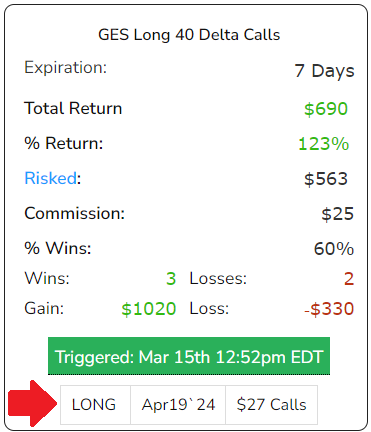
This is a discussion of the Triggered Now feature that appears on the Backtest tab within TradeMachine®.
On the Backtest tab, all TradeMachine® users have access to the Triggered/ Not Active feature.
- Immediately understand if a trading strategy’s conditions are met with real-time data
- Easy-to-interpret green and grey bars indicate active triggers or inactive conditions
- Up-to-the-minute updates on strategy viability
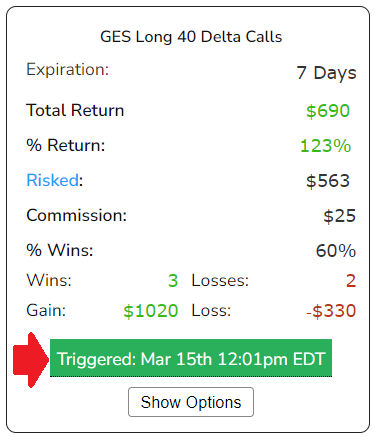
If all conditions of a backtest are met at that moment in time, at any point throughout the trading day, users will see a green bar that indicates that the conditions are Triggered currently.
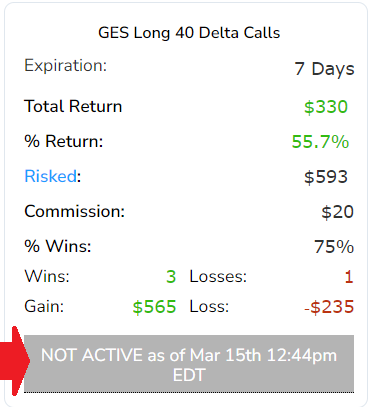
However, if the conditions for the backtest are not met, or they change later in the day, users will see a grey Not Active bar in its place.
By clicking "Show Options", TradeMachine® will show you the exact strike and expiry that TradeMachine® would use for the strategy, based on the backtester's rules for Options Selection.
Important Note: Show Options displays the options based on the strategy and backtest settings, it is not a recommendation to buy. As stated in the Show Options acknowledgment, verify strikes, expiration dates and pricing with your brokerage before placing a trade; displayed data may be delayed.